Distribuie


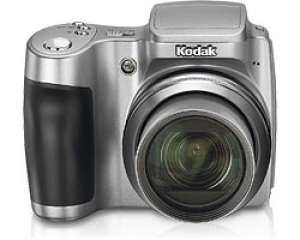
Adaugat la data de 6 Feb 2012 22:33 - ID: 398623
DESCRIERE
High zoom and professional-quality optics engineered for exceptional results
SCHNEIDER-KREUZNACH VARIOGON 10X Optical Zoom Lens delivers remarkable precision and sharpness
Get even closer with 5X digital zoom (35 mm = 50X total zoom)
6.1 MP for unbelievable print quality up to 20 × 30 in.
More pixels mean you can crop and enlarge, and still have great image quality
Exclusive KODAK Color Science Image Processing Chip
The exclusive KODAK Color Science Image Processing Chip delivers superior image quality for pictures that come to life just the way you remember it
A new high speed digital processor chip, advanced algorithms, and hardware acceleration features let the Z650 make simultaneous, split-second decisions to produce rich, vibrant, true-to-life colors in almost any lighting situation
Each time you click the shutter, the KODAK Color Science Chip performs an instantaneous and advanced analysis of collected scene data to identify and adjust multiple factors that influence picture quality
Scene light source is detected and adjustments are made to capture bright whites and true, vivid colors under difficult lighting conditions—fluorescent, tungsten, or daylight
Scene content is analyzed for luminance, focal distance, subject matter orientation, and color to determine the correct exposure and capture the natural details, accurate flesh tones, and rich colors you see in your composition
View and share your pictures with brilliance and clarity
The 2.0 in.LCD and electronic viewfinder (EVF) let you arrange your subject and evaluate the details of your shot before you move on
View your pictures right-side-up with auto picture rotation
In review mode, quickly magnify up to 8X, fast scroll through pictures, or view multi up
32 MB internal memory[1]plus a SD/MMC card expansion slot lets you keep shooting longer
Manual and custom controls at your fingertips
Program auto, aperture priority, shutter priority, and custom modes
Program mode (P)—camera sets optimal shutter speed and aperture combination
Aperture priority mode (A)—you choose aperture, the camera sets shutter speed
Shutter priority mode (S)—you choose shutter speed, the camera sets aperture
Manual controls
Exposure compensation—±2.0 EV in 1/3 EV step increments
Aperture—f/2.8–f/8
Shutter speeds—automatic; 1/8–1/1700 sec; manual 8–1/1000 sec.
ISO equivalents—80–160 (automatic) and 80, 100, 200, 400, 800[2](selectable)
Auto focus—single AF, continuous AF, multizone, center-zone
Exposure metering type—auto: TTL-AE; selectable: multi-pattern, center-weighted, center spot
White balance—auto, daylight, tungsten, fluorescent, and open shade
Flash mode—auto, red-eye reduction, fill, off
Histogram feature
Verify the exposure of your picture using the histogram feature on live view, quick view, and review
Continuous shooting modes and auto focus
First burst mode—captures up to 4 frames in rapid succession at 2.5 fps
Last burst mode—captures up to 30 frames at 2 fps, with the last 3 frames saved
Using dual sensing technologies, the Z650’s high speed, low light, auto focus system precisely fine tunes and sharply defines your subject in both low light and bright light situations
The auto focus system with assist lamp helps capture consistently crisp, sharp pictures even in low light
Continuous auto focus provides 0.3 second click-to-capture time (with preview on), wide continuous AF
It’s never been easier to capture quality pictures and video
Picture enhancing and editing features
On-camera cropping—frame your picture on the spot with on-camera cropping, without the need for a computer
Digital red-eye reduction—use the digital red-eye reduction feature to eliminate red eye while capturing a picture in real time
Multiple scene modes
Portrait modes—portrait, self portrait, night portrait, backlight
Landscape modes—landscape, night landscape, fireworks
Bright scene modes—beach and snow
Action modes—sport and children
Close-up modes—macro and flower
Party mode—use for photos of people in indoor setting in lower light
Text/Documents mode—ensures sharp text when photographing documents
Manner/Museum mode—use when sound or flash are not desired
5 color modes
High color
Low color
Natural color
Black and white
Sepia
Catch all the action with continuous video
Choose settings for VGA (640 × 480 pixel resolution) at 11 fps, or QVGA (320 × 240 pixel resolution) at 20 fps—both with MPEG-4 compression
Capture up to 80 minutes continuous video with audio, depending upon size of external memory card; or 5, 15, 30 second clips
Share universally with QUICKTIME Video format
The simple way to share
The Z650 is part of the KODAK EASYSHARE System, so sharing your pictures is amazingly simple. Just press Share.
On-camera Share button
Sharing starts right on the back of the camera
Have a picture you want to share? Tag it using the exclusive on-camera Share button and it will be ready to print or e-mail later
Use the Favorites feature to keep your special pictures close
KODAK EASYSHARE Software (included)
The simple way to organize, print, and share.
Organize your pictures to find them instantly
Select from a variety of easy to use printing options, including the One Touch to Better Pictures feature, which automatically adjusts inkjet printer settings to make Kodak quality photos when using KODAK Inkjet Photo Papers
Share pictures quickly with friends and family
Get creative, edit, and do more with your pictures
KODAK EASYSHARE Camera Dock Series 3 (optional accessory)
Transfers your pictures at the touch of a button
Instantly uploads pictures to your computer for viewing, printing, and e-mailing
Charges your KODAK Camera Battery in less than 3.5 hours[3]
USB connection (USB 2.0 compatible)
Simple ways to print your pictures at home
Real KODAK Pictures are just a touch away with our convenient home printing options.
KODAK EASYSHARE Photo Printer 500 (optional accessory)
Print real KODAK Pictures from digital media cards and USB devices, including PictBridge-enabled digital cameras
View and edit on the large 3.5 in.display
Works with or without a computer
Features KODAK PERFECT TOUCH Technology for better, brighter prints
Features red-eye reduction
Wireless capability (Wi-Fi ready[4 ], BLUETOOTH® Wireless Technology enabled)
KODAK EASYSHARE Printer Dock Plus Series 3 (optional accessory)
Create real KODAK Pictures, from mini-photo size up to 4 × 6 in., in 90 seconds or less[5]
Use it with or without a computer
Transfer pictures at the touch of a button and charge your camera’s battery with ease
IMAGELINK Print System and PictBridge compatible
SCHNEIDER-KREUZNACH VARIOGON 10X Optical Zoom Lens delivers remarkable precision and sharpness
Get even closer with 5X digital zoom (35 mm = 50X total zoom)
6.1 MP for unbelievable print quality up to 20 × 30 in.
More pixels mean you can crop and enlarge, and still have great image quality
Exclusive KODAK Color Science Image Processing Chip
The exclusive KODAK Color Science Image Processing Chip delivers superior image quality for pictures that come to life just the way you remember it
A new high speed digital processor chip, advanced algorithms, and hardware acceleration features let the Z650 make simultaneous, split-second decisions to produce rich, vibrant, true-to-life colors in almost any lighting situation
Each time you click the shutter, the KODAK Color Science Chip performs an instantaneous and advanced analysis of collected scene data to identify and adjust multiple factors that influence picture quality
Scene light source is detected and adjustments are made to capture bright whites and true, vivid colors under difficult lighting conditions—fluorescent, tungsten, or daylight
Scene content is analyzed for luminance, focal distance, subject matter orientation, and color to determine the correct exposure and capture the natural details, accurate flesh tones, and rich colors you see in your composition
View and share your pictures with brilliance and clarity
The 2.0 in.LCD and electronic viewfinder (EVF) let you arrange your subject and evaluate the details of your shot before you move on
View your pictures right-side-up with auto picture rotation
In review mode, quickly magnify up to 8X, fast scroll through pictures, or view multi up
32 MB internal memory[1]plus a SD/MMC card expansion slot lets you keep shooting longer
Manual and custom controls at your fingertips
Program auto, aperture priority, shutter priority, and custom modes
Program mode (P)—camera sets optimal shutter speed and aperture combination
Aperture priority mode (A)—you choose aperture, the camera sets shutter speed
Shutter priority mode (S)—you choose shutter speed, the camera sets aperture
Manual controls
Exposure compensation—±2.0 EV in 1/3 EV step increments
Aperture—f/2.8–f/8
Shutter speeds—automatic; 1/8–1/1700 sec; manual 8–1/1000 sec.
ISO equivalents—80–160 (automatic) and 80, 100, 200, 400, 800[2](selectable)
Auto focus—single AF, continuous AF, multizone, center-zone
Exposure metering type—auto: TTL-AE; selectable: multi-pattern, center-weighted, center spot
White balance—auto, daylight, tungsten, fluorescent, and open shade
Flash mode—auto, red-eye reduction, fill, off
Histogram feature
Verify the exposure of your picture using the histogram feature on live view, quick view, and review
Continuous shooting modes and auto focus
First burst mode—captures up to 4 frames in rapid succession at 2.5 fps
Last burst mode—captures up to 30 frames at 2 fps, with the last 3 frames saved
Using dual sensing technologies, the Z650’s high speed, low light, auto focus system precisely fine tunes and sharply defines your subject in both low light and bright light situations
The auto focus system with assist lamp helps capture consistently crisp, sharp pictures even in low light
Continuous auto focus provides 0.3 second click-to-capture time (with preview on), wide continuous AF
It’s never been easier to capture quality pictures and video
Picture enhancing and editing features
On-camera cropping—frame your picture on the spot with on-camera cropping, without the need for a computer
Digital red-eye reduction—use the digital red-eye reduction feature to eliminate red eye while capturing a picture in real time
Multiple scene modes
Portrait modes—portrait, self portrait, night portrait, backlight
Landscape modes—landscape, night landscape, fireworks
Bright scene modes—beach and snow
Action modes—sport and children
Close-up modes—macro and flower
Party mode—use for photos of people in indoor setting in lower light
Text/Documents mode—ensures sharp text when photographing documents
Manner/Museum mode—use when sound or flash are not desired
5 color modes
High color
Low color
Natural color
Black and white
Sepia
Catch all the action with continuous video
Choose settings for VGA (640 × 480 pixel resolution) at 11 fps, or QVGA (320 × 240 pixel resolution) at 20 fps—both with MPEG-4 compression
Capture up to 80 minutes continuous video with audio, depending upon size of external memory card; or 5, 15, 30 second clips
Share universally with QUICKTIME Video format
The simple way to share
The Z650 is part of the KODAK EASYSHARE System, so sharing your pictures is amazingly simple. Just press Share.
On-camera Share button
Sharing starts right on the back of the camera
Have a picture you want to share? Tag it using the exclusive on-camera Share button and it will be ready to print or e-mail later
Use the Favorites feature to keep your special pictures close
KODAK EASYSHARE Software (included)
The simple way to organize, print, and share.
Organize your pictures to find them instantly
Select from a variety of easy to use printing options, including the One Touch to Better Pictures feature, which automatically adjusts inkjet printer settings to make Kodak quality photos when using KODAK Inkjet Photo Papers
Share pictures quickly with friends and family
Get creative, edit, and do more with your pictures
KODAK EASYSHARE Camera Dock Series 3 (optional accessory)
Transfers your pictures at the touch of a button
Instantly uploads pictures to your computer for viewing, printing, and e-mailing
Charges your KODAK Camera Battery in less than 3.5 hours[3]
USB connection (USB 2.0 compatible)
Simple ways to print your pictures at home
Real KODAK Pictures are just a touch away with our convenient home printing options.
KODAK EASYSHARE Photo Printer 500 (optional accessory)
Print real KODAK Pictures from digital media cards and USB devices, including PictBridge-enabled digital cameras
View and edit on the large 3.5 in.display
Works with or without a computer
Features KODAK PERFECT TOUCH Technology for better, brighter prints
Features red-eye reduction
Wireless capability (Wi-Fi ready[4 ], BLUETOOTH® Wireless Technology enabled)
KODAK EASYSHARE Printer Dock Plus Series 3 (optional accessory)
Create real KODAK Pictures, from mini-photo size up to 4 × 6 in., in 90 seconds or less[5]
Use it with or without a computer
Transfer pictures at the touch of a button and charge your camera’s battery with ease
IMAGELINK Print System and PictBridge compatible
IMAGINI
MESAJ
COMENTARII SI RECENZII

Home · Adauga anunt · Modifica anunt · Login · Inregistrare firma · Forum · Widget anunturi · Semnalati o neregula · Contactati echipa Anunturi AZ ·
Index produse: A B C D E F G H I J K L M N O P Q R S T U V X Y Z
Va doriti propriile produse listate aici ? Creati-va propriul magazin virtual pe aaz.ro.
Informatiile despre preturi, produse si servicii sunt oferite de terte parti si doar pentru informare. AAZ.ro nu garanteaza acuratetea informatiilor si nu este raspunzator pentru nici o eroare, omisiune sau intarzieri,
nici pentru orice neintelegeri sau pierderi datorita acestor informatii. Termeni si conditii | Politica de confidentialitate | Stergerea contului | Cookies | Siguranta online | ANPC | Contact





AAZ.ro © 2008
Index produse: A B C D E F G H I J K L M N O P Q R S T U V X Y Z
Descarca gratuit aplicatia pentru telefonul tau

Va doriti propriile produse listate aici ? Creati-va propriul magazin virtual pe aaz.ro.
Informatiile despre preturi, produse si servicii sunt oferite de terte parti si doar pentru informare. AAZ.ro nu garanteaza acuratetea informatiilor si nu este raspunzator pentru nici o eroare, omisiune sau intarzieri,
nici pentru orice neintelegeri sau pierderi datorita acestor informatii. Termeni si conditii | Politica de confidentialitate | Stergerea contului | Cookies | Siguranta online | ANPC | Contact
AAZ.ro © 2008